 Flas
One account. Every child. Their own place on the path.
Most language apps assume one adult with one phone. Flas assumes a parent who wants their children to speak Albanian too — on their own devices, without an email address or a password of their own, and with you able to see how they are doing.
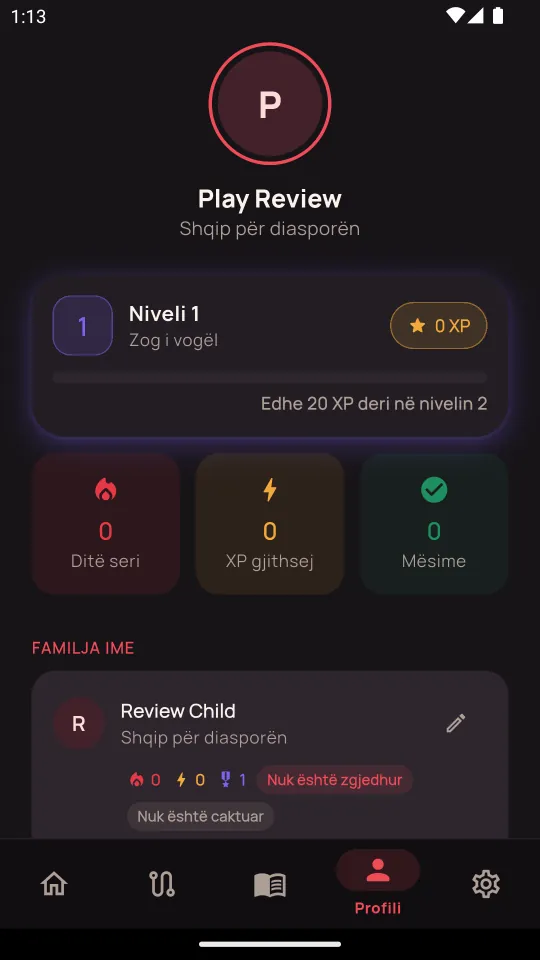
How you add a child, and what happens next.
- 1
Start with your own account
You can learn as a guest first, but a child needs a parent account to hang off: the family code is checked against your email. When you are ready, create the account with Google, Apple or an email — your own progress comes with you.
- 2
Open your profile and tap "Add kid"
A short form, filled in by you, not the child:
Their name — this is what the app greets them with. Age group: under 12, 12–18, 19–35 or 36+. The language they already speak at home, so the course can meet them there. Which course: Albanian, or German for Albanian-speaking kids. Their level — how much Albanian they already have, which is separate from their age. Two siblings routinely differ. A daily goal: 3, 10 or 20 minutes.Each child gets their own profile with their own XP, streak, badges and position on the path. Nothing is shared between siblings, and nothing of theirs touches your own progress.
- 3
Create their family code
On the child's card, tap "Create a code". Flas issues a six-character code made of letters and digits, unique to that child. You can copy it, or share the code and your email together in one message.
- 4
The child signs in on their own device
Install Flas on their phone or tablet and tap "I'm a child" on the first screen. They type the code and your email — and they are in. That is the whole sign-in:
No email address for the child. No password to invent, forget or share. The code is checked against your email on the server, so a mistyped code is caught in seconds. - 5
What the child sees
Their own dashboard, with their name, their goal ring, their streak and their next lesson. The same lessons as yours, with the same real voice — but their path, their level, their badges. A child account cannot add children, change the family or touch billing.
- 6
What you see
Tap a child on your profile to open their progress page:
Day streak, total XP and current level. This week's activity and how many days the goal was met. Course progress — lessons done out of the total, and accuracy by unit. Badges earned. Parent controls: change their level, their daily goal, age group or home language at any time.You can also practise as a child from your own phone — useful for a little one who shares your device — and the progress lands on their profile, not yours.
- 7
One subscription covers them all
Access flows from the parent. Whatever plan you hold — Familja monthly or Shqiponja yearly — covers every child on your account, on every device. A child never has a subscription of their own, because a child is never the one who would pay.
A child's account holds almost nothing.
A child profile is a first name, an age group, a level and a goal. There is no email, no password, no photo, no location. Children sign in with a code tied to your account, and you can delete their profile — and everything under it — whenever you like.
Speaking exercises use the phone's own speech recognition to score a phrase. The audio is not sent to Flas and is not stored anywhere.
Flas shows no ads and uses no advertising or analytics trackers, for adults or children. The full policy is short enough to read: flas.io/privacy.
Add them as a child and switch to them from the learner menu on the dashboard. Their lessons count towards their own streak, and yours stays yours.
Your first lesson is ten seconds away.
No account, no card. Learn on your own, or bring the whole family along.